
Smart Card Personalization Workflow: From Data Encoding to Quality Control Best Practices
Smart Card Personalization Workflow: From Data Encoding to Quality Control Best Practices
Published: 2026-08-01 | Zowinda Card Personalization Technical Reference
Card personalization transforms blank smart card bodies into individually programmed, printed, and finished products ready for issuance. It is the highest-value-add step in the entire smart card production chain -- where a generic card worth $0.10-$0.50 becomes a secure credential worth $5-$50 or more. This end-to-end workflow guide covers every stage from blank card input through final QC, with best practices drawn from production environments running 24/7 at scale.
The Complete Personalization Workflow
A modern smart card personalization station performs these sequential operations:

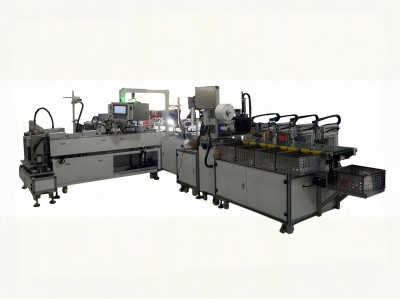
Figure 3: Multi-station smart card personalization and encoding system
- Card Feed and Transport: Blank cards are loaded into an input hopper (typically 200-500 card capacity) and fed one-by-one via a friction-wheel or vacuum-pick transport mechanism. Card thickness (0.76mm for standard ISO cards) and material (PVC, PET-G, ABS) affect feed reliability settings.
- Electrical Personalization (Data Encoding): The chip contact pads make connection with spring-loaded pins (for contact cards) or an RF field (for contactless). Data is written according to the card specification (EMV, ISO 7816-4, MIFARE, etc.). Write success is verified by reading back the written data.
- Magnetic Stripe Encoding (if applicable): For cards with HiCo/LoCo magnetic stripes, track data (ISO 7811) is encoded magnetically. Verification read-back confirms encoding integrity.
- Thermal Printing: Variable text (name, number, expiry date) and graphics are printed using dye-sublimation or resin thermal transfer technology. Print resolution ranges from 300 DPI (entry-level) to 600 DPI (premium). Monochrome or color options depend on print head configuration.
- Topcoat/Lamination (optional): A clear protective overlay is applied over the printed area to resist abrasion, UV fading, and chemical exposure. Critical for cards with multi-year service life (ID cards, driver licenses).
- Embossing (optional): Raised characters are mechanically stamped into the card surface for traditional embossed-card applications (bank cards requiring imprinter compatibility).
- Quality Inspection: Automated vision systems verify print quality, encode correctness, and physical integrity. Defective cards are diverted to a reject bin with error logging.
- Output Stacking: Finished cards are collected in an output hopper, optionally banded or shrink-wrapped for the next process stage.
Personalization Equipment Comparison Matrix
Quality Control Checkpoints
Encode Verification
Every card must pass a write-then-read-back verification cycle. Failed writes are immediately rejected before printing (avoiding waste of consumables on bad cards).
Print Quality Scan
High-resolution camera inspects each printed card for smudging, misalignment, color deviation, and missing elements against a golden template.
Physical Integrity
Sensors detect delamination, cracking, warping, and dimensional out-of-spec that may have occurred during the high-pressure embossing or lamination steps.
Data Consistency
Cross-check that printed data matches encoded data (the number on the card face must equal what is stored on the chip or magstripe).
Throughput Optimization Tips
- Batch similar jobs together: Minimize changeover time between jobs by grouping cards with the same print layout, encode format, and output bin destination.
- Pre-load data files: Have the next job's data file pre-loaded and validated while the current job is still running. Eliminates job-setup idle time.
- Monitor ribbon consumption: Set up low-ribbon alerts at 15% remaining. Unplanned ribbon changes during a production run cause significant downtime.
- Balance reject rates: If reject rate exceeds 0.5%, investigate root cause immediately. Common culprits: dirty contact pins, worn print heads, out-of-spec blank cards.
- Preventive maintenance schedule: Clean transport rollers weekly, replace contact pins monthly, calibrate vision system quarterly. Document all PM activities.
Common Pitfalls to Avoid
- Underestimating data preparation time: Data file formatting, deduplication, and validation often take longer than expected. Build buffer time into project schedules.
- Neglecting ribbon/card compatibility: Not all thermal ribbons work optimally with all card substrates. Test ribbon+card combinations before committing to bulk purchases.
- Ignoring environmental factors: Temperature and humidity affect print quality and static discharge (which can damage chips). Maintain 20-25C and 40-60% RH in the personalization area.
- Skipping the pilot run: Always produce a small sample batch (50-100 cards) before full production. Catch template errors, data mapping issues, and color calibration problems early.
Ready to Upgrade Your Personalization Capacity?
From entry-level single stations to fully integrated industrial lines, we offer personalization solutions for every scale. Request a technical consultation today.
Email: [email protected]
WhatsApp: +86 186 2085 0485
 Automatic Glue Tape Lamination
 Custom Auto Antenna Embedding
 Boost Your Efficiency with a F
 High-Speed Disposable PE Bag P
Please contact us with your request
We are ready to answer your questions.